
Seavus Project Viewer is deployed in one of three ways, depending on how many people use it and how much control the IT department wants. This white paper describes each model, then the Windows Installer technology they all rest on.
Deployment options
| Model | What it is |
|---|---|
| Single user | A stand-alone, web-downloadable configuration covering a small group of users in a tightly defined geographic area |
| Concurrent user | A single installation on a designated application server, with a license server that maintains the concurrent usage policy |
| Single company key | A custom MSI build for a blend of physical (MSI) and thin-client, multiple-server (Citrix) deployment, sized for an entire country |
Single-user installation
The single-user installation is the default and most common way of installing the product. It can be downloaded from the internet after purchasing a single-user license, and it is bound to the computer where the application is installed: all users of that machine have access to it.
Benefits
- Simple and easy for a single user, a small workgroup, or small to medium companies with non-restrictive software installation policies
- Simple to maintain for fewer than 100 installations
Disadvantages
- Complex deployment and upgrade for more than 100 installations
- The activation process becomes cumbersome to maintain if more than 100 licenses are required
- The auto-update features are lost in IT environments that restrict downloading software over the internet through company firewalls
Concurrent installation
The concurrent user installation is a special setup, available on request, for customers who want to streamline application ownership costs and keep deployment easy. A custom installer puts the application on a network-accessible server, activates the installation and installs the license server that maintains the concurrent usage policy.
End users access the application from a network location published by the application server. Because the application cannot find a license key on the local machine, it tries to locate the license server through a network discovery protocol, which assumes that network traffic is not obstructed by a local or domain firewall. After contacting the server it requests authorization to run, which depends on the number of currently available concurrent licenses.
Benefits
- Low maintenance costs
- A single point for installation and upgrade
Disadvantages
- Cannot be used outside the network, or by roaming users with portable computers
Single company key installation
The single company key is the most versatile and configurable way of deploying the product in an enterprise with more than 100 licenses. It consists of a single custom-made installation package, an MSI, built from a customized build that does not require activation.
The IT department can deploy it in the ways the MSI framework supports, or with advanced enterprise deployment tools from Microsoft, Wise, Novell, Citrix or others: to a network location for a single point of installation, as a non-attended push installation to thousands of workstations, or as a managed set of versions held in a structured and secure way.
Benefits
- Low maintenance costs
- High configurability
- The greatest freedom for system administrators
Disadvantages
- Requires advanced knowledge of deployment servers and tools
Windows Installer
Microsoft Windows Installer is a base service of the Windows operating system that manages the state of software applications: installation, modification, upgrade and removal. It provides consistent, reliable methods to customize installations, update and upgrade applications, resolve configuration problems, manage shared resources, enforce consistent file version rules, and diagnose and repair applications at runtime.
Before Windows Installer, each application carried its own setup rules, and setups could do the wrong thing — installing an older version of a file over a newer one, or losing track of shared-component reference counts so that installing or removing one application broke another. With Windows Installer, the operating system implements the installation rules, and an application only has to describe itself in a Windows Installer package.
Among the problems the model addresses: adding, upgrading or deleting an application damaging other installed applications; consistent and reliable version rules; system-wide management of shared resources; a failed state change destabilizing the system; restoring the pre-installation state; complicated setup customization; a standardized command-line interface; a standard way of customizing applications; distributing software to low-rights users; installing software with administrator-controlled elevated privileges; accidental file deletion requiring a reinstall; and on-demand installation.
Windows Installer is an engine for managing application state, not a software distribution technology. Distribution technologies use it to install and manage applications, mostly through its command-line capabilities. The Group Policy-based software deployment component of Windows Server 2003 and Windows Server 2008 provides additional benefits by using the advanced functionality in Windows Installer.
The three elements
The technology is made of three elements that work together: the Windows Installer client, the Windows Installer service, and the Windows Installer package (an .msi file).
The client is any application that calls Windows Installer to perform a task. Common clients are the Windows shell, Add or Remove Programs in Control Panel, Windows Installer-enabled applications such as Office 2016 or Office 2013, and software distribution technologies such as Systems Management Server (SMS) and the software installation component of Group Policy in Windows Server 2016 and Windows Server 2012. The client handles user interaction, such as displaying the setup user interface.
The service uses the information in a package file to manage every phase of installing a program — add, change, upgrade and remove — by copying files, making registry changes, creating desktop shortcuts and displaying dialogs to capture user preferences. It is part of Windows 10 (all distributions), Windows 8.1 (all distributions), Windows 8, Windows 7 and Windows Vista.
The package contains a database that stores the instructions for the service and the data needed to manage the state of a program. An .msi file can contain instructions for installing over a prior version, or for installing on a computer where the application has never been present.
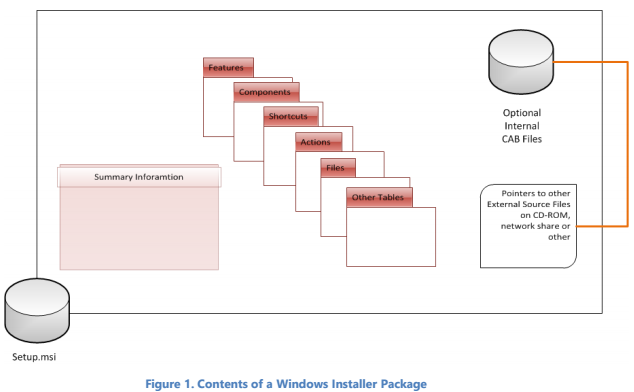
Enterprise software distribution
Any distribution technology that can pass a command line to a system can take advantage of Windows Installer.
Group Policy-based software deployment
The Group Policy-based deployment component is built into Windows Server 2016 and Windows Server 2012. Administrators can centrally install and manage applications across the organization: deploy, upgrade, patch and remove software for groups of users and computers instead of managing each desktop separately, and give users reliable access to the applications they need from any computer on the network. Windows Installer is a core component of this technology.
The white paper suggests it for small to medium organizations where Active Directory is deployed, where there is a solid base of Windows XP Professional or later clients, and where Group Policy provides the management features the organization requires.
Systems Management Server
For medium to large organizations that need more advanced software management, SMS adds inventory-based targeting, status reporting, server- and client-side scheduling, multiple site facilities, complex targeting, centralized hardware and software inventory, remote diagnostic tools, software metering, and support for Windows 10, Windows 8.1, Windows 8, Windows 7 and Windows Vista clients. It does not require Active Directory.
Its benefits: verifying that target computers meet setup requirements from inventory, inventorying hardware and software across the organization, scheduling distribution to shares so network performance stays acceptable, targeting users and computers by defined rules, scheduling installations to keep bandwidth at desired levels, tracking usage by user, group, workstation, time or license quota, and diagnosing and repairing performance problems on specific computers or across the network.
Citrix MetaFrame Presentation Server
Citrix MetaFrame Presentation Server, the foundation of the MetaFrame Access Suite, manages enterprise applications from a central location and delivers them to users wherever they are. It is certified to run on Windows Server 2012 and Windows Server 2016 and supports virtually any custom or commercially packaged Windows or web application.
Novell ZENworks
ZENworks manages the lifecycle of desktops, laptops, servers and handheld devices through policy-driven automation, across Windows, Linux and NetWare. Its Desktop Management component configures, updates and troubleshoots workstations from a single location — inside or outside the firewall — enforces a standard configuration, migrates personal and application settings, automates patch assessment and deployment, packages and customizes software, self-heals applications, provides remote management with file transfer and real-time diagnostics, and inventories desktop hardware and software for troubleshooting and auditing.
Wise Package Studio
Wise Package Studio migrates applications to Windows Installer and adds quality assurance tools, project and data management, repackaging, customization, validation and distribution system integration.
Novadigm Radia
The Radia Management Suite is a policy-based software and configuration management solution for heterogeneous desktop platforms, managed from a web-based console. It collects hardware and software inventory across platforms, prepares packages and runs impact analysis before distribution, targets desktops, workgroups or entire populations, provisions operating systems, applications and content from any location, integrates with help desks and other management tools, and scales to enterprise needs.