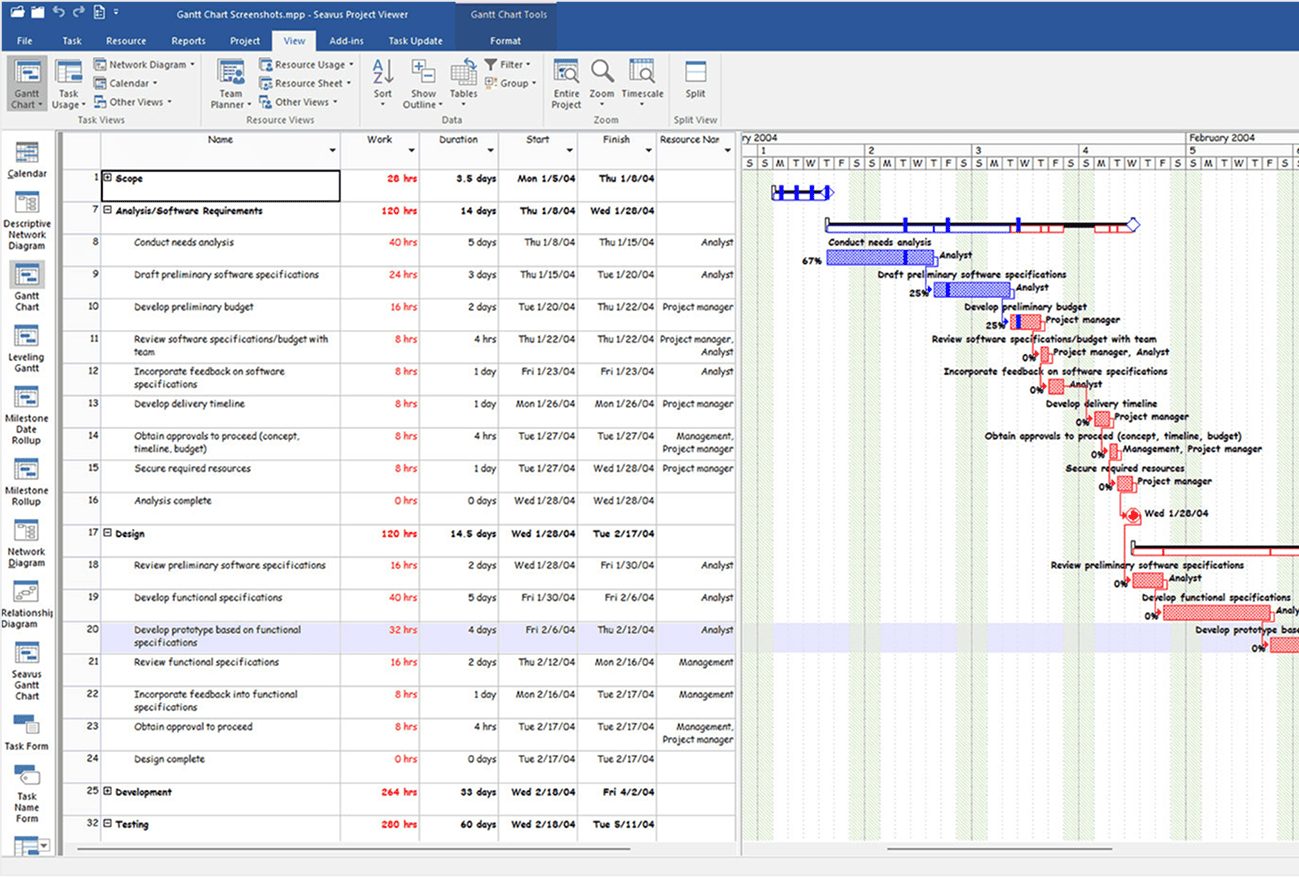












Microsoft Project Viewer to Open and View MPP Files
#1 Microsoft Project Viewer intended for all project team members and employees to open MS Project plans in the mpp format.
The Leading MPP Viewer Used by Two-Thirds of Fortune 500 Companies


VIEW ACCESS TO MICROSOFT PROJECT PLANS FOR ALL EMPLOYEES
Not every member of your broader project team needs a full MS Project license to view mpp files
Seavus Project Viewer costs only fraction a full MS Project license! Check out our volume discounts for companies and enterprises.
Executives
Individuals who are responsible for one or more projects, entire departments or a specific region of the organization, can benefit by gaining visibility into the microsoft project plan for which they are responsible. This will help them to easily determine the overall project status, ensure work is aligned with the strategic goals of the organization and project is on time and on budget. Using the MS project reporting functionality these user can also view the same reports available in the Project app.
Project Team Members
Personnel responsible for many of the operational activities that are scheduled in one or more projects to which they are assigned can look at their assignments in the different projects by viewing the microsoft project plan, provide feedback on finished tasks and make sure they are always aligned with the project schedule.
Project Stakeholders
Other external stakeholders and personnel working at the organization other than the project owner, directly or indirectly involved in the project, can also view the mpp file to get insights, reports, review project assignments or simply follow the overall project status.
100% Matching Views as in Microsoft Project
Seavus Project Viewer supports more than 27 views as in Microsoft Project, providing the same display of the project information to any project stakeholder using the software. In addition to the standard views, Seavus Project Viewer™ is capable to work with user-defined views, i.e. the views that the project manager has created in Microsoft Project and saved in the project plan, i.e. the .mpp file.
- Shows 100% of the views as in MS Project.
- Supports user-defined views.
- Opens MPP plan from latest project version.
Generate Graphical Reports and Dashboards
- Supports the predefined MS Project reports.
- Provides descriptive reports for stakeholders
- Enables a complete overview of project’s health.
Why Choose Our Viewer for Microsoft Project files
View Microsoft Project files without MS Project
With Seavus Project Viewer you can make project data available to the whole organization for just a fraction of MS Project's price. You don't have to have a full MS Project license for every organization member to view mpp files derived from Microsoft Project Plan.
Securely Share Project Data
With Seavus Project Viewer, your project information stays in-house. This mpp viewer doesn’t store data, minimizing the risk of making it available to third parties.
Collaborate Seamlessly on Project Communication
The Task Update Add-in allows updating the status of assigned project tasks. It also allows Project Managers to get real-time updates on each team member's tasks status, thus improving project communication.
Use an Intuitive and User-Friendly Interface
Seavus Project Viewer supports 100% of the views available in MS Project standard and MS Project professional. Your team can use it right away thanks to the familiar interface that follows Microsoft standards.
Access 27+ Views for Different Roles
All views are available to every user, providing unique opportunities to view data depending on their needs.
Extract Reports with One Click
In-depth reports on all information of the project such as Costs, Project Overview, Upcoming Tasks, and Work Overview.
Multi-Language Project Reader Support
Available in 11 different languages: English, German, French, Spanish, Czech, Japanese, Chinese, Russian, Dutch, Polish, and Italian.
Robin Brightman – Jungheinrich Group.
Since most of our users need to open very large .mpp files from time to time, it was an important part of our evaluation and one that Seavus Project Viewer was able to accomplish with no problems.
Satoshi Futatsumori – IT Promotion Team Fuji Electric
There might have been a big lost because of the poor productivity if we reduce the number of MS Project licenses to purchase. But thanks to Seavus Project Viewer, we could reduce the license cost and improve productivity at the same time.
Jean-François Sauvé. – Fido’s Manager of Software and Head of the company’s search efforts.
Since most of our users are familiar with Microsoft Project, we wanted a project viewer that looked and worked as close as possible to Microsoft Project, but at a fraction of the cost.
Denis Berniqué Canadian Government – Indian and Northern Affairs, Canada
I want to thank you for the quick and thorough response This is just a little thank you and compliment to the Seavus Customer Support agent as well as to the sales person I contacted with: I want to thank you for the quick and thorough response. It was well explained, and answered all my questions perfectly! Thanks again.
IT Asset Manager – Copenhagen Airport
We needed a tool to supplement our company's need just to view and open project files created by project managers with Microsoft Project. We wanted to deploy a lightweight Project Viewer software application that met our company needs and could reduce our license costs for expensive MS Project installations.
Mr. Martin Arend – EMH metering GmbH & Co. KG
It is great to work with Seavus Project Viewer, very user friendly, and for a lower price then other viewers. It has exactly the same view as Microsoft Project Viewer, and some other features that allow me to configure my toolbar many the way I like. Very easy to use and with deep functionality.
Learn and Explore
EXPERIENCE THE BEST MS PROJECT VIEWER FOR TEAMS OF ALL SIZES
See why millions of people use Seavus Project Viewer to view mpp files created in Microsoft Project 2024, Microsoft Project 2021, MS project 2019.
- Free 15-Day Trial
- All Features
- No Credit Card Required
IF YOU CAN SEE IT IN MICROSOFT PROJECT, YOU CAN SEE IT IN SEAVUS PROJECT VIEWER!
- Open mpp files without Microsoft Project
- Fully compatible with the latest MS Project 2021
- Display of all MS Project views with 100% accuracy.
- Task Update Collaboration Add-in.
- Integration for Microsoft Server SharePoint & One Drive.


